Business info
About you and your business: your name and mobile, your yard name, phone, website, office address and time zone, and your legal and tax info.
Business info is the first setup step. It tells your site who you are, how sellers reach your business and where it is. Enter the name sellers know you by; your legal name comes from Support.
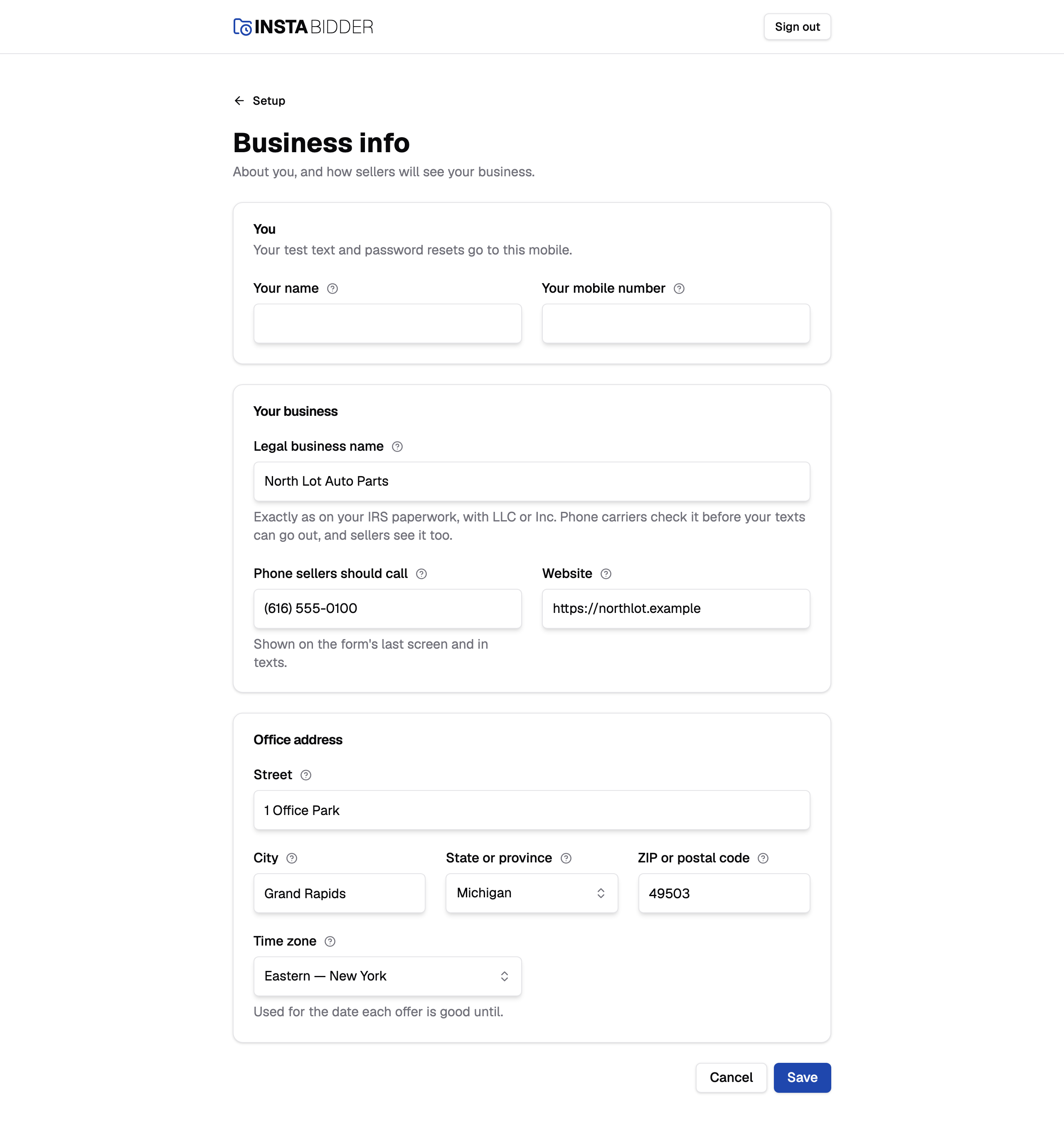
When InstaBidder put your site up from your account, your yard name, phone, website, office address and time zone are already filled in from it, and so is the yard's Admin when the account named one; check them and change what's wrong.
Fill in every field and choose Save. Your site returns you to the setup steps, and Change history records that business info was saved. Cancel takes you back to the steps without saving. You can reopen Business info from Setup in the sidebar whenever something changes.
A field that's missing or wrong is marked in red with what to fix, and nothing is saved until every field passes.
You
The first card is about you, the person setting up the site. Your test text and your password reset links go to the mobile number here.
When InstaBidder's team fills in Business info for you, the card is titled "The yard's Admin" instead, and its fields read Their name, Their email and Their mobile number. If your account already named that person, the fields open filled in. Saving it adds that person to your site as an Admin, or keeps them, and texts them a link to choose a password. See Adding the yard's Admin.
Your name
Your name, as it shows in Change history and in the invite texts you send. Up to 120 characters.
Your teammates see it beside the changes you make, and in the list of people on your site. Leave it empty and your site says "Enter your name, up to 120 characters."
Your mobile number
Your test text and password reset links go to this mobile. Enter a US or Canadian mobile number.
Your site needs a mobile number for you before you can invite anyone, because reset links are texted to it. Enter one with its area code, for example (602) 555-0134. Brackets, spaces and dashes don't matter, and a leading 1 is fine. Anything that isn't ten digits gets "Enter a US or Canadian mobile number."
Once it's saved, the box becomes read-only and says "Change it on your profile". That's because changing the number needs your current password. Your profile has the field. Saving your first number here keeps you signed in.
Their email
The email the yard's first Admin signs in with. It appears only when InstaBidder's team fills in Business info on your behalf.
It's the address on the invite, so it must be one the Admin reads. It can't be one that's already on your site's list of people; your site says "Someone with that email is already on the list."
Adding the yard's Admin
When InstaBidder's team saves this card, the person in it is added as an Admin and texted an invite. The text reads "Your team invited you to InstaBidder", with a link that works once, for 48 hours. An Admin your account named is already on your site's list of people when it's put up, with no password yet; the first save of this card texts them, with or without changes.
- If the text fails, the reason shows in red at the top of the page, ending "Save again to resend it." The person is saved anyway. Choose Save again, with or without changes, and the invite is texted again.
- Until they've chosen a password, the card can be corrected: change the name, email or mobile and save again. A new mobile number gets a new text, and the link sent to the old one stops working. Once a text has gone out, saving with the same number doesn't text again; to send a fresh link, use Resend invite on the Team step.
- Once they've set a password, the card is read-only and says "They've set their password, so only they can change these, on their profile." They change their own details on their profile.
Your business
How sellers see your business and reach you.
Yard name
The name sellers see on your form, in texts and on your site's pages. Your legal name is below, under Legal and tax info.
Use the name on your sign; it doesn't have to be your legal name. Up to 120 characters. If it's empty or too long, your site says "Enter the yard name sellers know you by, up to 120 characters."
Once your texting registration is underway, carriers have the name, so the field says to tell Support before changing it; Support resubmits the registration with the new name. See Yard name.
Legal and tax info
Your legal name, EIN, kind of business and authorized rep, read-only. InstaBidder Support files them with carriers to register your texting number.
They come from your InstaBidder account, exactly as on your IRS EIN letter, and only Support changes them: signed in to your site, InstaBidder Support sees Edit legal and tax info under the card, and everyone else sees it read-only. If the card says "Support still needs" something, like your legal name, email it to [email protected]. If something is wrong, tell Support the same way. See Legal and tax info.
Phone sellers should call
The number sellers call. It's shown on the form's last screen and in your texts.
Use a number that someone answers during your business hours. Type it the way you want sellers to read it, up to 40 characters, for example (602) 555-0100.
Website
Your business's web address, like northlot.com. Your site reads it for colors, and the seller form works only on pages of this website.
You can type it without "https://". Your site fills that in. It needs a dot, like northlot.com, and can be up to 300 characters; otherwise your site says "Enter the web address, like acme.com."
The Website and brand step reads this address to suggest your form's colors, and Seller form on your site uses it to say where the line to paste works.
Office address
Where your business is. This is your office, not where your trucks leave from; those are your locations.
The address fields work the same way as they do for your locations; Service area describes them. The ZIP or postal code must match the state or province you pick: a five-digit ZIP for a US state, a postal code like T2E 1L4 for a Canadian province.
Until setup is finished, your country follows this address: pick a Canadian province and your site reads in kilometres and postal codes. After that, you change your country in Yard settings and this address no longer moves it.
Time zone
The time zone your business works in. It sets the date each offer is good until.
Pick the zone of your office. Dates and times your site shows, for example when your test text arrived, follow it. When InstaBidder put your site up from your account, the account's zone is picked already.
The list has seven US zones and seven Canadian ones, each named for a city, such as "Central — Chicago". Arizona and Saskatchewan have their own entries, because they don't change their clocks. If none is picked, your site says "Pick a time zone."
Changing it later
Business info stays open to Admins after setup, from Setup in the sidebar. Some of the same details are on Yard settings too.
How the two pages share them, with Business on Yard settings:
- Yard name, phone, office address and time zone are on both. A save on either changes the same details.
- Your country is on Yard settings only.
- Your website is here only. Yard settings' Business info button brings you back to this page for it.
- Legal and tax info shows on both, read-only.